

Enabling function calling
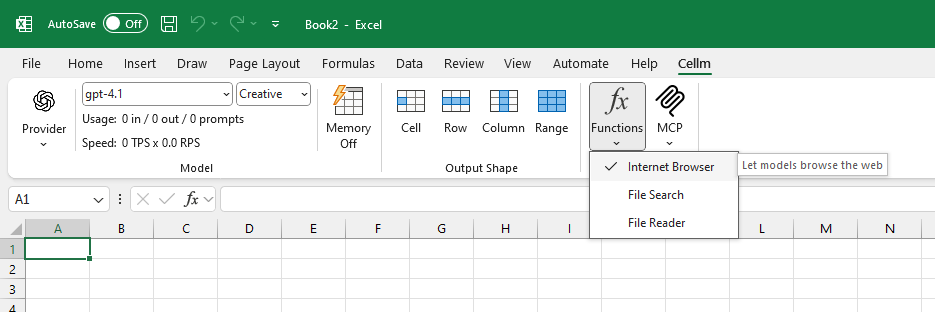
To allow models to call external functions, open the Cellm ribbon in Excel and check the functions you want to enable:- Internet Browser: Let the model access web pages.
- File Search: Let the model search for files om your computer.
- File Reader: Let the model read text files on your computer, such as code or PDFs.
Calling a function
When function calling is enabled, you can write prompts that leverage these functions. You can explicitly ask the model to use a specific function in or prompt or leave to the model to decide when to use it.Example 1: Searching for Files
Example 2: Classifying PDF files
Dos and Don’ts
Do:
- Be specific: Clearly tell the model which function to use and what to do. Instead of a vague prompt like “Analyze my invoices,” guide it with
"Summarize the PDF file at C:\Invoices\inv-123.pdf". - Use cell references for dynamic workflows: Put file paths or search queries in separate cells and reference them in your prompt (e.g.,
=PROMPT(A1, "Summarize this file")). This lets you drag formulas down to process hundreds of files at once. - Enable functions only when needed: For security and performance, only activate the functions required for your current task. Disable them when you’re finished.
Don’t:
- Don’t grant access to sensitive data with cloud models: Avoid using functions like File Reader or File Search on confidential documents if you are using a cloud-based AI model (like from OpenAI or Google). Use local models for privacy-sensitive tasks.
- Don’t write vague prompts: Avoid ambiguous requests like
"find the report"if you have multiple reports. The more precise your prompt, the more reliable the result.